
The travellers' internet: Designing applications for those on the move - part three
Over recent months I have been travelling through Europe and the Middle East, which has meant me using all kinds of web applications from internet access points that were not my usual domestic internet connection. On Monday I outlined some of the issues I encountered with browser compatibility, JavaScript and cookies. Yesterday I looked at some problems I experienced with one of the web's most talked about photo-sharing applications, Flickr which included the upload interface and the login process.
I also found Google's Gmail login to be inefficient on my travels - or maybe it was my inability to adapt to the quirk that was the inefficiency. Pretty much the same scene unfolded in internet cafes across the continent. My wife and I would be sharing a computer, and the first thing we would do is check Gmail, where she has her primary mail account, and where all my currybet.net mail was being forwarded to.
I'd open up the only browser available - Internet Explorer 6 - type http://www.google.com/gmail into the browser address bar, and wait for the page to load sufficiently that the focus was in the "username" entry field of the form.
I would start typing "martin" and at some point between typing the 'r' and the 't' of martin my wife would observe "You've done it again". I'd look up and see that I'd ended up typing 'tin.belam@' into the password field.
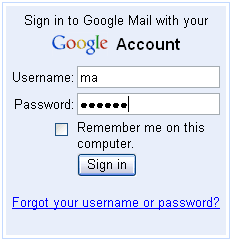
As the Gmail page finishes loading in Internet Explorer 6, the input focus switches from the username field to the password field. The only explanation I can find of is that it is a quirk caused by the loading of the script that puts the ever-incrementing storage size counter on the page, as the jump seems to happen at the same time as this page element renders. Switching JavaScript off stops this happening in IE. The ever-increasing number is a nice way of illustrating a point about Google's Gmail storage capacity, but if it causes the browser with the dominant market share to make a mess of the principle purpose of the page - to facilitate a quick and successful login - then it doesn't seem worth inflicting it upon the poor user. <ADDED>See the comments below - I am wrong about this - it is a different bit of JavaScript that causes the problem</ADDED>
Of course, over these posts I've mostly griped about things that niggled me in the applications I frequently use. I must say that one of the most revelatory things on my journey was how much the internet has revolutionised so many areas of life and commerce. I was astonished by how on the whole we were effortlessly able to book transport and accommodation across Europe, often at the last minute, just by sitting in an internet cafe in advance. It was only really the stretch of travelling from Belgrade to Dubrovnik via Sarajevo and Mostar where we had to physically go to bus stations to find out about departure and arrival times - everywhere else we were able to use the internet. In places like Germany we were even able to buy train tickets and print them out in advance.
Tourism is a thriving service industry in the developed world, and the World Tourism Organisation claims that 25% of tourism is by the under-25s seeking budget accommodation. So, what can businesses do to ensure that their product works well for this attractive demographic of travelling people?
I think the principle recommendations to businesses specifically targeting travellers would be:
- Include test cases in any QA process that examined how a web application degraded when the user had neither JavaScript or cookies enabled on the browser. Additionally I would suggest that any error catching around the availability of JavaScript or cookies is careful about implying that any browser preferences that inhibit functionality have been expressly chosen by the user, or are in the power of the user to change.
- Use standards compliant code, and ensure you test not just the appearance of a site across browsers, but the functionality of the site as well.
- Consider offering a 'lite' version of your stylesheet that would give the traveller the option of speeding up their browsing experience. Delivering a rich multimedia interface may not be suitable for travelling users in an internet cafe who want simply to get access to a web service as quickly (and therefore as cheaply) as possible.
- Test your login processes thoroughly. Don't forget there is more than the use cases of a new visitor for the first time, and a returning visitor with cookies set. In particular, test your login for flaws that may hold up returning visitors without access to cookies of JavaScript.
What happens is you're starting to type your username before the page has finished loading (which is, of course, perfectly fair). When it finishes loading, it runs some JavaScript (nothing to do with the size counter) that says "Is there anything in the username field? If there is, it must be a pre-filled username from last time, so focus straight on password field; if not, focus on username field." They could easily alter it to only do that if there was an entire email address in the username field, or something like that.