
'Spyware!' or 'How I ditched Windows and learned to love the Mac'
I'm one of those people who have been happily running Windows on PCs since the early nineties, and have never had any problems with virus infections, adware, spyware, or other malicious programs. In fact, I'd quite got myself into the self-righteous position of thinking that anybody who did have problems clearly didn't know what they were doing with computers.
So, it was somewhat dispiriting last month to discover that my laptop was riddled with a horrible infection.
I know exactly how it happened. I had to unexpectedly buy a new iPod in London whilst I was on a stopover, making my way from Greece to Macau. To populate it, I needed to fill it with the emergency 15Gb stash of music on my laptop. I put that together in 2005, in case either my iPod or my wife's iPod died whilst we were on our 'great adventure' through Eastern Europe. That was fine, but it meant that I didn't have any music with me that had been released post-December 2005. [1]
One quick visit with an unpatched version of μTorrent to some dodgy neighbourhoods on the web later, and my laptop was pwned. It was infected with a virus trying to get me to buy anti-virus software.
Symptoms included two new icons on my desktop that I couldn't delete. Whilst they pretended to be for 'Windows Update' and Microsoft's 'Help and Support Centre', the extraordinarily badly anti-aliased graphics marked them out as fakes, and they in fact acted as internet shortcuts to storageprotector.com
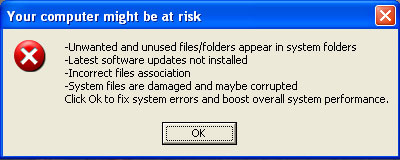
As well as that, I was getting a variety of nonsensical and badly-translated 'error messages' which tried to look like genuine Windows system alerts.
Important - Potential Errors found in the system

During a scan of files at system startup, potential errors in the system registry were found.

p-07-0100 irql: 1f SYSVER 0xff00024

NT_Kernel error 1256

KMODE_EXCEPTION_NOT_HANDLED
The laptop still ran reasonably well in Windows Safe Mode but had become pretty much unusable in normal operations. It meant every time I booted up I had to remember to press F8 repeatedly when I first powered up the laptop, until the Windows boot menu appeared.
My first port of call to get a remedy was to get some updates for my XP installation. Microsoft has a Malicious Software Removal tool, but I had no joy there. That isn't to say that it won't protect you from future infections, but it did nothing to fix my problem.
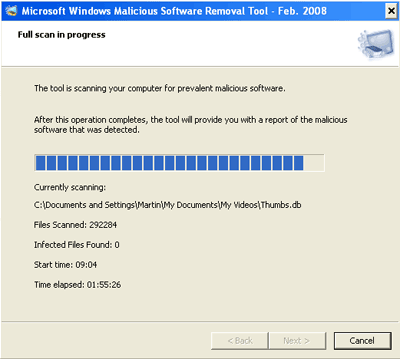
So I started a long trawl through the web to find a solution. One of the main problems with getting information was that I hadn't installed the 'Storage Protector' software the scumware was promoting. I found lots of people talking about the Storage Protector program itself, but not the problem I had.
A program called RogueRemover looked like it might have the answer. Of course, by now I felt a little at the mercy of events. It isn't beyond the realms of possibility that someone would set up a virus, and then set up an even more malicious program that purported to get rid of the program.
I did as much checking as I could of the credentials of RogueRemover, installed it, ran it, and it told me my machine was fine. The constantly spawning error pop-ups, slow running speeds, and repeated requests by Internet Explorer to get online and visit storageprotector.com said otherwise.
---------------------------

Your system could become unstable

---------------------------

A potential problem has been detected and Windows has been shutdown buggy application to prevent damage to your computer.

****WXYZ.SYS - Address F73120AE base at C00000, DateStamp 36b072A3

Kernel Debugger Using: COM2 (Port 0x28f, Baud rate 192000)

---------------------------
The next software I tried was Spyware Doctor. Again, reading about it, I thought it could cure the symptoms I had, and the program's online reputation seemed sound. Once installed, the scan of my laptop took hours, and the software identified plenty of problems with my machine.
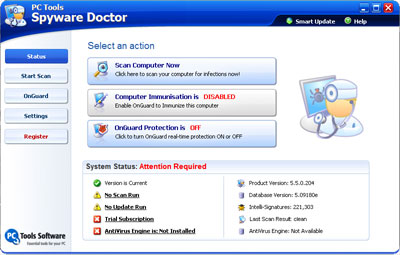
The sting was in the tail of course. Spyware Doctor will diagnose problems for free, but, unlike the NHS, getting treatment costs. You have to register and buy the software before it will attempt to repair any issues. I wasn't that impressed with all of the diagnosis either - Spyware Doctor was labelling as 'threats' things that looked trivial to me, such as cookies from perfectly reputable major online advertising networks.
Now, everything I read about this type of problem said I should be using HijackThis as my anti-spyware tool.
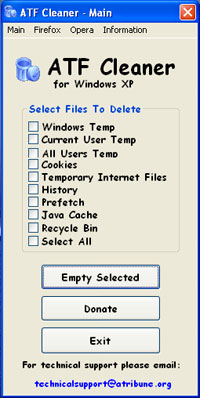
Before using this piece of software, there is a lot of advice about some preliminary checks to carry out on your Windows machine to tidy it up a bit. First off is a program called ATF Cleaner. This does a very thorough job of clearing up the temporary files deposited all over the machine. This was particularly important in my case, as one of the ways that the malware was slowing my PC down was by spawning thousands of tiny temporary files in my user directory, and at the root of my C:\ drive.
After then making a System Restore point, it was the turn of AVG Anti-Spyware software to scan my machine. This program is free for 30 days, but again, after a 3 hour scan of the files on my laptop, about the best it could come up with was some slightly dodgy cookies - but no fix for my ills.
Next on the list to use before running HijackThis to get a logfile for analysis was SUPERAntiSpyware Home Edition. I started installing it, when I suddenly got this message from my machine:
The system administrator has set policies to prevent this installation
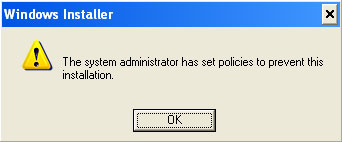
And that, after about 25 elapsed hours trying to fix the problem over the last 4 weeks, and still no closer to a solution, was the moment when I lost the will to live.
And the moral of the story....?
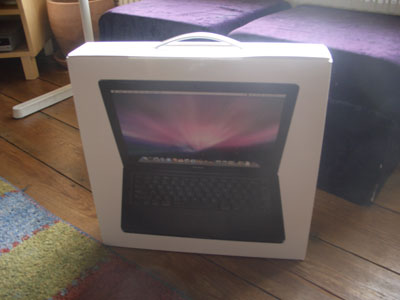
I'm posting this from my brand new MacBook. [2]
[1] Most importantly it meant I didn't have copies of the four albums I've been playing to death recently - Radiohead's 'In Rainbows', Goldfrapp's 'Seventh Tree', and both Arcade Fire albums. [Return to article]
[1] That makes us a 3 operating system family now. My main desktop machine is still running Windows, and my wife has an Asus EEE running Linux. [Return to article]
Presuming you didn't have the original Windows disks with you? Sometimes you just can't beat a complete re-install for solving problems.
Thankfully my (Windows) PCs have never been nabbed, but then I'm almost unnaturally paranoid about these things!
Woohoo, welcome to the Macbook party. I bought one 2 years ago, and have never looked back.
The mac mini is a good buy if you have desktop machines that need replacing too.
Did you ever consider actually BUYING an antivirus software like Norton? Its cheaper than buying a MACbook
But nowhere near as cute...
Ditch windows for good I have its the best thing you do
I use a mac as my main pc for photos and videos
my laptop witch came with a virus called V.I.S.T.A i removed it and installed ubuntu linux Iam posting this from my ubuntu machine
Boot from linux CD copy all your ablms and files to a usb stick/hard drive then click install select USE ENTIRE DISC when installing ubuntu and bye bye windoze
Or.....just purchasing the removal software that the virus is advertising would be lots cheaper.
Oh, Julie, therefore financially rewarding the people who knackered my machine and encouraging their tactics? Wow, nice one. A bit like leaving crappy idiotic one line comments to try and get backlinks, I think that kind of behaviour has no place on the web so I try not to facilitate it...