
Using image search on Slide
I've been looking at the search services across a number of the most popular photo-sharing sites, with a view to understanding whether the much celebrated tag driven folksonomy really makes Flickr the easiest place to find images. Today I am looking at a service called Slide.
Slide has seen a marked growth in popularity in the first half of this year, and, according to Hitwise in the USA, in June 2006 it was the ninth most popular photo sharing site, commanding 1.95% of the market. The growth has been fuelled because Slide has positioned itself to work very closely with people's MySpace accounts, allowing them to embed Flash slideshows like the one below into their MySpace pages.

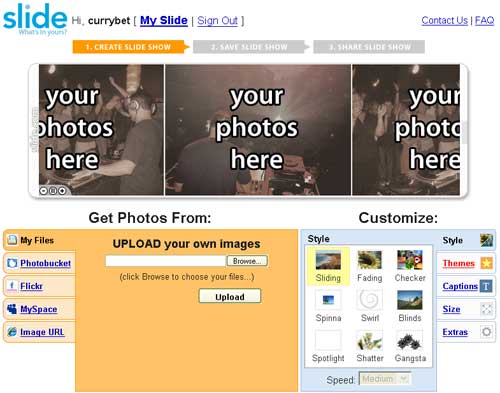
As such it isn't strictly a pure photo storage and sharing service, and the interface for creating a slide show integrates with other services including Photobucket and Flickr, but you can upload your own images to the service.
The search results pages at Slide display results from the slideshows that have been made public - and so each result has up to four thumbnail images indicating the content of an individual slideshow. The thumbnails are 90px wide and 70px high.

For each result you can see the title of the slideshow, and the username of the user who made it. There is also a count of the number of slideshows in the system by that particular user, and how many 'favourite' slideshows this user has registered within the Slide site. If you are logged in as a user there is also a link to add each result to your collection of favourites.

A full results page lists 24 slideshows.
The search on Slide.com worked well for finding some pretty generic images, like that of 'puppies' or of a 'party'. It didn't work so well for quite specific enquiries like 'kraftwerk', or for some more general terms like 'cycling'. Here I think the search system is somewhat at the mercy of the kind of content uploaded by the user base - there were no useful images of 'stripes', but 'cool' and 'awesome' as search terms generated plenty of results.
Adding quotes to the string didn't cause a phrase match - and so some two word searches worked a little haphazardly. A search for 'Victoria line' didn't bring back anything relevant, although a search for 'Trevi fountain' did produce images of the landmark in Rome.
Slide.com also allows you to search through the directory of member names, and uses links at the bottom of the result set to allow the user to switch between searching for slideshows or for the creators of slideshows.

Above the search box on search results page the site displays a changing selection of category-style suggesting things that the user might search for - for example 'popular' or 'celebrity'

Like Flickr, Slide.com allows users to tag their slideshows, and also has a page illustrating new and popular tags. The tag cloud suggest that a slideshow featuring sexy hot cute girls having fun whilst drunk at a christmas party would be a big hit on the service.

The most recently added tags cloud also seemed to indicate that not all users have a complete grasp of how to tag their images.

Here is a feature summary of search on Slide:
| Slide - feature summary | |
|---|---|
| Number of results | 24 |
| Result display | 24 x 1 list, each items displaying up to four thumbnail images |
| Maximum thumbnail image size | 70px high by 90 px wide |
| Title | Yes |
| Description | No |
| Photographers name | Yes |
| Photographers photo count | Yes |
| Photographers Favourite count | Yes |
| Add to 'My favourites' button | Yes |
| Picture taken date | No |
| Uploaded date | No |
| Tags displayed | No |
| Restrict search to my own pictures | No |
| Help with spelling | No |
| Search full text or tags option | No |
| 'Sort by' options | No |